This is an script developed for Macromedia Fireworks, that applies some action in a picture, to get an Pseudo HDR effect to improve dynamic range of light.
The creator of steps to get the effect on Fireworks, is la100rra in his post Pseudo HDR en Fireworks - Tutorial (spanish).
I only took that excellent tutorial, and create the script that automatizes all the steps.
I have tested the script with Macromedia Fireworks 8 and Adobe Fireworks CS3.
Download: PseudoHDR.jsf
How to run the script in Macromedia Fireworks 8:
1. Open the picture and enter Commands menu and select to execute command file...
 2. Select the script and click Open
 3. Wait just a second... and you are done! These are examples of results obtained


2009-04-05
Updated december 19th/2009
Here you can find custom builds for Rockbox. These inlcude the patch FS#7652 that adds support for M3U Extended Playlists.
This is useful to view playlists generated with iPod/iTunes to RockBox Playlist Converter.
Rockbox builds with M3U extended playlists patch
Source used for these builds: rockbox_source.zip
How to enable support for M3U Extended Playlists in Rockbox.
1. Enter Playlists in the root menu.
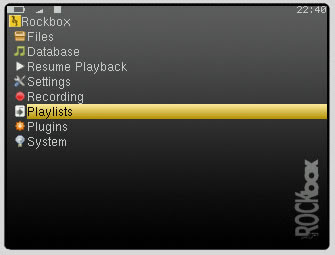
2. Enter to View Catalog option (this shows content of Playlist folder on iPod.)
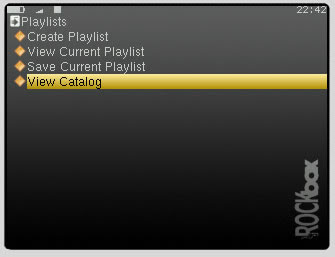
3. Select any of your playlists.
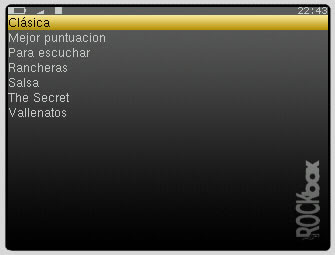
4. Enter View Current Playlist to view content of playlist selected.
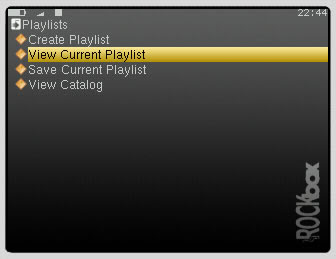
5. You see the songs in playlist.
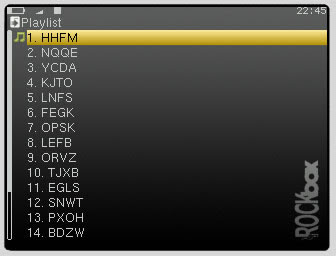
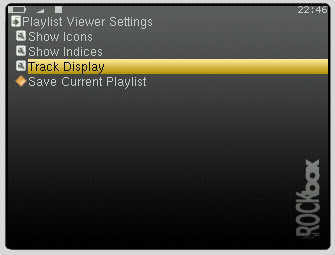
6. Press Menu on the wheel to enter settings of viewer, and select Track Display.
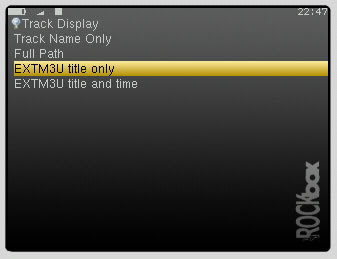
7. Select EXTM3U title only or EXTM3U title and time option. (this options are added by the patch)
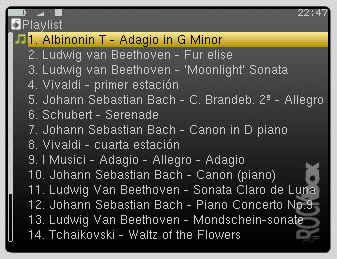
8. Return to view your playlist and now you can see it like you wanted.
2008-09-26
New version 2.1 (08 august/10)
This application can extract the album art embedded in music files, and create the necessary files to display album art correctly in RockBox.
If you have an iPod, you can take a look at iPod Album Art Extracter for RockBox.
RockBox supports Album Art but with some limitations like described in his wiki page AlbumArt.
Between the limitations are that does not support Embedded album art, only external image files in BMP or JPG format.
This application is addressed to make easy the visualization of album art in Rockbox. It scan music files and extract, convert and save album art in a external file, just what Rockbox needs.
 The following characters will be replaced with an underscore (_) in the filename of the AlbumArt file generated, : \ / : < > ? * |. Double quotes will be replaced by singlequotes.
Now you can see album art displayed in RockBox, and use PictureFlow to visualize albums.
Download:

- In Windows it needs .NET framework 2.0+ to run (can be downloaded from here: .NET Framework 2.0 Service Pack 1 (x86)).
- In Linux it needs Mono Runtime 2.0+ to run (can be downloaded from here: Mono 2.0)
This app uses TagLib#.
Changelog:
2.1 - 08 august 2010
- Update TagLib# version to 2.0.3.7
- When the location is .rockbox/albumart foder, it looks first for albumartist tag and if it doesn't exist, then uses artist tag.
- Update TagLib# version to 2.0.3.2.
- Include support for JPG output format, as well as BMP.
- Support for ALL locations and conventions which Rockbox looks for Album Art.
- New layout.
- Added option for overwrite Album Art file if already exists.
- Doesn't need to generate temp files anymore, it saves directly the final Album Art in the location desired.
- Enhanced example of filename output.
- Include support for .m4a files.
- Now doesn't create .rockbox/albumart directory without asking, instead you must choose it.
- Bug fix: Doesn't recognize file extensions in upper case.
- Now it works in Linux with Mono Runtime libraries!!
- Added a detailed log of errors found while processing files.
- Added an option to include [artist] in filename.
- Minor changes to layout and UI.
- Initial release.
2008-03-04
New Version 2.0 (04 september/2010)
This application can extract the album art embedded in the music files in a iPod, and create the necessary files to display album art correctly in RockBox.
RockBox supports Album Art but with some limitations like described in his wiki page AlbumArt.
Between the limitations are that does not support Embedded album art, only external image files in BMP or JPG format.
This application is addressed to make easy the visualization of album art in Rockbox. It reads the iPod database to find music files then it does the folowing actions:
- Scan and extract album art from music files.
- Resize the albums extracted.
- Convert the format to bmp or jpg.
- Move the file converted to a folder in the iPod (or any other location).

The album art files are stored in iPod_Control\Music\ folder in the iPod by default.
The following characters will be replaced with an underscore (_) in the filename: \ / : < > ? * |. Double quotes will be replaced by singlequotes.
Now you can see album art displayed in RockBox, and use PictureFlow to visualize albums.
Download:

It needs .NET framework 2.0+ to run (can be downloaded from here: .NET Framework 2.0 Service Pack 1 (x86)).
This app uses SharePodLib and TagLib#.
Changelog:
2.0 - 04 september 2010
- Update TagLib# version to 2.0.3.7.
- When option Use .rockbox/albumart format is checked, it looks first for albumartist tag and if it doesn't exist, then uses artist tag.
- Added option to use original album art size.
- Include support for JPG output format, as well as BMP.
- New layout.
- Added option for overwrite Album Art file if already exists.
- Doesn't need to generate temp files anymore, it saves directly the final Album Art in the location desired.
- Enhanced example of filename output.
- Include support for .m4a files.
- Bugfix: "include artist name in filename" was not working properly.
- Added a detailed log of errors found while processing files.
- Added an option to include [artist] in filename.
- Minor changes to layout and UI.
- Added an option to change the final location by user.
- Added an option to include size in filename or not.
- Added an option to change the size of picture files generated (between 10 and 500 pixels).
- Change the filenames of picture files to albumtitle.sizexsize.bmp, and final location to iPod_Control\Music\ to make it ready for PictureFlow.
- Minor improvements to layout and interface.
- Initial release.
2007-12-19
Current version: 1.01 (9 february 2008)
This application can generate playlist for RockBox from the Smart Playlists and Normal Playlist in a iPod.
This application can generate playlist for RockBox from the Smart Playlists and Normal Playlist in a iPod.
It reads all the Playlists stored in the iPod generated with iTunes, and it let you select which ones you want to make rockbox compatible.
 Click the "Generate Playlist for Rockbox" button and it creates a playlist for each one with the same name in *.m3u8 format, so it can be read from rockbox. The playlists created are stored in the "Playlists" folder in the iPod (that folder is created if doesn't exist), because this is the folder that rockbox look when you select to view the Playlist Catalog.
I want to make clear, that actually it doesn't convert the ipod playlist, but makes a copy in *.m3u format and put it in a Playlist folder in your ipod. It doesn't modify in any way the iPod Database or the original playlist.
Because the music files are stored by iTunes in a particular way, the path files in the playlist generated looks like this:
/iPod_Control/Music/F00/PJOU.mp3/iPod_Control/Music/F43/EQTS.mp3/iPod_Control/Music/F49/EJBX.mp3/iPod_Control/Music/F13/IUDV.mp3
This is not a problem when you are playing the playlist, because rockbox reads the metadata (ID3 tag) of the music files and shows the correct artist and song name. But when you are exploring the playlist content, you aren't able to know the real song names... the only thing you see is:
1.PJOU2.EQTS3.EJBX4.IUDV
But that issue have a solution. There is a M3U Extended Format that stores the length of the song and the title and artist name. A description of Extended M3U can be found here.
iPod/iTunes to RockBox Playlist Converter creates the playlists in this extended format, but RockBox still needs to understand the M3U Extended Format and show the names correctly. Fortunately there is a patch made by Xinlu Huang that does exactly that. I hope that that patch be accepted soon and integrated in to the code of RockBox. The patch is FS#7652
/iPod_Control/Music/F00/PJOU.mp3/iPod_Control/Music/F43/EQTS.mp3/iPod_Control/Music/F49/EJBX.mp3/iPod_Control/Music/F13/IUDV.mp3
This is not a problem when you are playing the playlist, because rockbox reads the metadata (ID3 tag) of the music files and shows the correct artist and song name. But when you are exploring the playlist content, you aren't able to know the real song names... the only thing you see is:
1.PJOU2.EQTS3.EJBX4.IUDV
But that issue have a solution. There is a M3U Extended Format that stores the length of the song and the title and artist name. A description of Extended M3U can be found here.
iPod/iTunes to RockBox Playlist Converter creates the playlists in this extended format, but RockBox still needs to understand the M3U Extended Format and show the names correctly. Fortunately there is a patch made by Xinlu Huang that does exactly that. I hope that that patch be accepted soon and integrated in to the code of RockBox. The patch is FS#7652
Update 5th april 2009: Now you can download custom builds for Rockbox with the patch!!
Download:

iTunes must be closed and it needs .NET framework 2.0+ to run (can be downloaded from here: .NET Framework 2.0 Service Pack 1 (x86)).
Hope it can help you and if you use it i'll be glad to receive some feedback. If you want source code just mail me.
Changelog:
1.01 - 9 february 2008
- this characters : \ / | * ? < > " are not compatible with the filesystem, so now it's replaced by underscore (_) if is present in the playlist filename.
- Added a link to webpage.
- Initial release.
Subscribe to:
Posts (Atom)